Inside Parall
els RAS 21.2: A Single-Tenant Reference Architecture for SSO, MFA, SAML, GPU and FSLogix
By XenTegra India, Leading Digital Transformation Partner
Parallels RAS has always been the pragmatist's choice in application and desktop delivery: one installer, one console, one license covering everything from the connection broker to load balancing. With the 21.x generation — and specifically the 21.2 release — Parallels has closed the remaining gaps that used to push mid-market and enterprise customers towards heavier stacks. Modern SAML-based single sign-on that now works consistently across every client OS, hardened MFA with conditional RADIUS automation, first-class FSLogix support, mature image management on Nutanix AHV, and — the headline of 21.2 — an open hypervisor plugin framework that lets you connect RAS to virtually any virtualisation platform via PowerShell.
This article lays out a complete single-tenant reference architecture for Parallels RAS 21.2, then maps that same design onto five infrastructure scenarios: Nutanix, VMware, the Open Hypervisor framework, Azure, and AWS. If you are evaluating a Citrix or Omnissa migration, or designing a net-new deployment, this is the blueprint conversation we have with customers every week.
What "Single-Tenant" Means in RAS Terms
In a single-tenant deployment, the entire RAS Farm — every site, gateway, broker and session host — serves one organization. There is no Tenant Broker, no shared gateway tier fronting multiple customer farms, and no cross-tenant isolation logic to design around. This is the model the vast majority of enterprises run: your Active Directory, your certificates, your session hosts, your data — all inside your own security boundary, whether that boundary is a datacentre rack or a cloud subscription.
Single-tenant does not mean single-site. A single-tenant farm can and should span multiple sites for geographic distribution or active-active resilience, all managed from one console.
The Core Architecture: Components and Traffic Flow
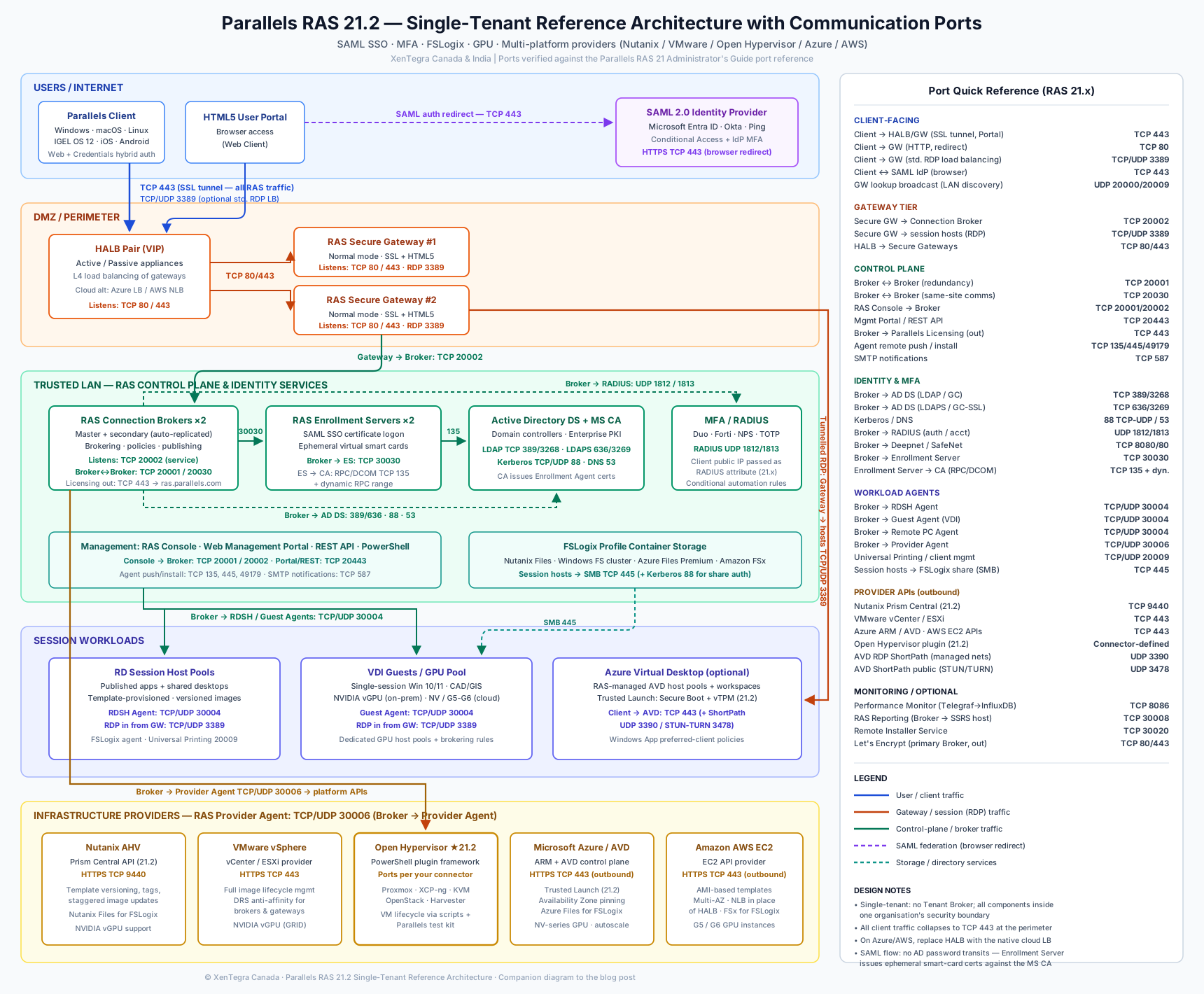
A production-grade single-tenant RAS 21.2 farm consists of the following tiers:
Connection Broker (Publishing Agent). The brain of the farm. It authenticates users against Active Directory, evaluates publishing rules and filters, applies client policies, and brokers sessions to the least-loaded host. Deploy a minimum of two per site — the first holds the master role and replicates configuration to secondaries automatically. Broker failover is native; there is no separate SQL database tier to design, which remains one of RAS's most underrated operational advantages over competing brokers.
Secure Gateway. The single point of entry for all client traffic — RDP over SSL (port 443), the HTML5 User Portal, and Wyse/ThinOS broker protocols. Gateways can run in normal mode (tunnelling all session traffic) or forwarding mode for DMZ designs. In 21.x, Secure Gateway alerting gained configurable thresholds for failed tunneled sessions, so your monitoring signals stay meaningful rather than firing on every transient blip.
High Availability Load Balancer (HALB). A pre-packaged virtual appliance providing Layer 4 load balancing across gateways, deployable in active-passive pairs with a shared virtual IP. For cloud scenarios you can substitute the native cloud load balancer (Azure Load Balancer / Application Gateway, or AWS NLB/ALB), which we cover in the platform scenarios below.
RD Session Hosts and VDI Guests. The workload tier — multi-session Windows Server hosts for published applications and shared desktops, and single-session VDI guests (or Azure Virtual Desktop hosts) where user isolation, GPU dedication, or specific application compatibility demands it. RAS 21.2 manages both from the same host-pool constructs, with template-based provisioning, versioning and scheduled image updates.
Enrollment Server. The component that makes true SAML SSO possible. When a user authenticates via SAML, no Windows password ever transits the system — so the Enrollment Server enrols short-lived virtual smart card certificates on behalf of the user against your Microsoft Certificate Authority, enabling seamless logon to the Windows session. Deploy two for redundancy, and treat this server as Tier 0 infrastructure: it holds an Enrollment Agent certificate and interacts directly with your PKI.
Management plane. The RAS Console, web-based management portal, REST API and a substantially expanded PowerShell module. In 21.x the API surface matured to the point where full infrastructure-as-code farm builds are realistic — something we lean on heavily for repeatable customer deployments.
The traffic flow is straightforward: client → HALB VIP → Secure Gateway → Connection Broker (authentication and brokering) → session host. All of it can be collapsed onto fewer servers for smaller environments or scaled out horizontally per tier.
Identity: SAML SSO Done Properly
SAML 2.0 support is where RAS 21.2 genuinely shines. RAS acts as the SAML Service Provider, integrating with Microsoft Entra ID, Okta, Ping Identity and any SAML 2.0-compliant IdP.
The end-to-end flow works like this: the user hits the User Portal or launches the Parallels Client, is redirected to the IdP, completes authentication (including whatever conditional access and MFA policies the IdP enforces), and is returned to RAS with a signed assertion. The Connection Broker validates the assertion, maps the SAML attribute (typically UPN or an SID-based custom attribute) to the AD identity, and the Enrollment Server issues the ephemeral certificate that logs the user into their Windows session — no password prompt, no credential caching, no LSASS exposure of a reusable secret.
Two 21.x refinements matter for architects:
First, hybrid "Web + Credentials" authentication — combining SAML IdP authentication with AD credentials — is now available across macOS, Linux, IGEL OS 12, Android and iOS, where previously it was Windows-only. For mixed-endpoint estates (and IGEL is a natural pairing given XenTegra's practice across both), this closes a long-standing consistency gap.
Second, the 21.x security hardening around the SAML pipeline: the Registration.crt export now contains only the public key used to verify launch-token signatures, and the SAML LSASS card manager process is actively monitored. Small details, but exactly the kind that matter in a security review.
MFA: Layered, Conditional, Context-Aware
RAS supports MFA natively via RADIUS (Duo, Cisco, FortiAuthenticator, and any RADIUS-speaking provider), TOTP authenticator apps (Microsoft/Google Authenticator), email OTP, and Deepnet DualShield — in addition to whatever MFA your SAML IdP enforces upstream.
The 21.x releases added meaningful depth here:
- Client public IP capture as a RADIUS attribute. The client's public IP is passed during MFA authentication, enabling IP-based policy enforcement, contextual access decisions and cleaner audit trails across native clients, the User Portal and web connections. The lookup can use Parallels' own IP lookup service, a third-party service, or a self-hosted lookup for air-gapped or sovereignty-sensitive environments — a point we flag specifically for Canadian public-sector customers.
- Conditional RADIUS automation. Rule-based, user-specific authentication responses — for example, applying different MFA behaviour to service desk accounts versus standard users, or bypassing a second factor for connections already inside a trusted network zone.
- Windows Credential Manager integration on the Windows client for secure credential storage, removing another category of locally cached secrets.
The recommended design pattern for most customers: enforce primary MFA at the SAML IdP (Entra ID Conditional Access or Okta policies), and reserve RAS-native RADIUS/TOTP MFA for legacy authentication paths or as defence-in-depth on privileged publishing.
FSLogix: Profiles That Follow the User
For any multi-host design — which is every design — profile portability is non-negotiable. Parallels RAS integrates FSLogix Profile Containers directly into the console: you configure the VHD locations, sizing, and exclusions centrally, and RAS handles agent deployment to session hosts. The 21.x releases track current FSLogix builds, so you are not left validating compatibility yourself after each Microsoft update.
Architecturally, the FSLogix file share is a Tier 1 dependency and should be designed accordingly per platform:
- On Nutanix, Nutanix Files is the natural home — same cluster, same support relationship, sub-millisecond locality.
- On VMware, a clustered Windows file server or your existing NAS (with SMB continuous availability) serves well.
- On Azure, Azure Files Premium with AD DS or Entra Kerberos authentication is the reference pattern, sized on IOPS per concurrent user rather than capacity.
- On AWS, Amazon FSx for Windows File Server is purpose-built for exactly this workload, with multi-AZ deployment for resilience.
Pair Profile Containers with Cloud Cache where you need profile availability across two storage locations — for example, active-active sites or a DR posture.
GPU: When Sessions Need Real Graphics
GPU strategy in RAS splits into two questions: where does the GPU live, and how is it shared?
For on-premises scenarios, RAS session hosts and VDI guests consume GPU via the hypervisor's virtualisation layer — NVIDIA vGPU (GRID) profiles on VMware vSphere and Nutanix AHV both work cleanly, carving physical GPUs (L4, L40S, A16-class cards) into fractional profiles per session host or per VDI guest. Full PCIe passthrough remains an option where a single power user justifies a whole card. On multi-session RD Session Hosts, one vGPU profile accelerates every session on the host, which is typically the most cost-efficient pattern for engineering teams using AutoCAD, Revit or GIS tooling at moderate intensity.
For cloud scenarios, you select GPU-enabled instance families at the template level: NVadsA10 v5 / NVads V710-series on Azure, or G5/G6 instances on AWS. RAS's autoscaling then treats GPU hosts as just another host pool — scale them on schedule for the design team's working day and deallocate them overnight, which is where the cloud GPU economics actually get justified.
Enable RemoteFX-successor GPU acceleration policies per host pool, and keep GPU pools separate from general-purpose pools so brokering rules can direct CAD users, and only CAD users, at the expensive silicon.
Scenario 1: Nutanix AHV — The Strategic On-Prem Play
Parallels RAS 21.2 makes a decisive architectural move on Nutanix: connectivity shifts from the legacy AOS API to Prism Central, the control plane of modern Nutanix architecture. This is not cosmetic — it aligns RAS with Nutanix's platform lifecycle and multi-cluster reality, and it means a single RAS provider can address workloads governed through Prism Central rather than per-cluster Prism Element endpoints.
Equally significant: the extended image management capabilities introduced for Azure, AVD, Hyper-V and VMware in earlier releases — template versioning, lifecycle tags, staggered and scheduled template updates — are now fully available on Nutanix AHV. In practice, that means you can maintain a golden image, publish version 2.1 to a canary host pool on Tuesday, and stagger the fleet-wide rollout over the weekend, all natively.
Reference layout: two Connection Brokers and two Secure Gateways as AHV VMs across separate hosts (anti-affinity), HALB pair fronting the gateways, RDSH templates provisioned via Prism Central, FSLogix on Nutanix Files, vGPU via AHV's NVIDIA support for the graphics pool. For customers consolidating from three-tier infrastructure, RAS-on-Nutanix is the cleanest EUC stack we deploy — one hyperconverged platform, one delivery platform, two support relationships total.
Scenario 2: VMware vSphere — The Installed-Base Reality
vSphere remains the most common substrate we encounter, and RAS treats vCenter and standalone ESXi as first-class providers with full template-based provisioning, image versioning and scheduled updates. The architecture mirrors the Nutanix layout: brokers and gateways as VMs with DRS anti-affinity rules, templates maintained in vCenter, linked-clone-style provisioning from RAS-managed templates, NVIDIA vGPU for accelerated pools.
The commercial subtext matters here. Many VMware customers are re-evaluating their EUC stack following the Omnissa divestiture and Broadcom licensing changes. RAS lets you keep the vSphere investment you have already made while replacing the delivery layer above it — and because RAS licensing is a single concurrent-user SKU with every feature included, the TCO conversation against Horizon or Citrix on the same hardware is usually short.
Scenario 3: Open Hypervisor — The 21.2 Headline
The most structurally interesting feature in 21.2 is the open hypervisor plugin framework: RAS can now integrate any hypervisor or virtualisation platform through a standardised PowerShell script connector. VM enumeration, power operations, template handling, provisioning — the full lifecycle is driven by your own connector scripts. Parallels supplies sample scripts, a dedicated integration guide, and a PowerShell test kit for validating connectors outside the console.
Why this matters: the virtualisation market is fragmenting. Proxmox, XCP-ng, OpenStack/KVM, Harvester and sovereign-cloud platforms are all gaining ground as VMware alternatives, and until now, EUC brokers supported a fixed vendor list — full stop. With 21.2, if your platform exposes a management API, you can write the connector and manage it from the same RAS console as everything else. The 21.2 release also demonstrates the framework's practical value in-family, with support for Scale Computing HC3 9.6 keeping edge-oriented deployments current.
For XenTegra's offshore Centre of Excellence, connector development is precisely the kind of engineering our India team delivers: a scoped PowerShell integration, validated against the Parallels test kit, handed over with documentation. If you are running a non-mainstream hypervisor and assumed enterprise app delivery was out of reach — it no longer is.
Scenario 4: Microsoft Azure — Cloud-Native and AVD-Integrated
Azure is where RAS 21.2 layers the most cloud-specific capability. Two provider models exist, and they compose:
RAS-managed IaaS: RAS provisions session hosts directly as Azure VMs from templates, with full image lifecycle management. 21.2 adds support for Trusted Launch VM security — Secure Boot and virtual TPM — hardening session hosts against boot-level and firmware attacks, and allows administrators to pin session hosts to specific Azure Availability Zones, so an active-active host-pool design across zones becomes an explicit architectural decision rather than an accident of placement.
Azure Virtual Desktop integration: RAS manages AVD host pools, workspaces and application groups, layering its own management, autoscaling and unified client experience over the native AVD control plane. The 21.x client roadmap is aligned with Microsoft's transition to the Windows App ahead of the Remote Desktop client deprecation in 2026, with RAS policies governing preferred client and version management. The Cloud Cost Insight Dashboard introduced in 21.0 gives finance-grade visibility into AVD consumption — genuinely useful when the CFO asks what the desktop estate costs per user per month.
Reference layout: brokers and gateways in a hub VNet (or replace HALB with Azure Load Balancer), session hosts zone-distributed in spokes, FSLogix on Azure Files Premium, Entra ID as SAML IdP with Conditional Access enforcing MFA, GPU pools on NV-series with schedule-based autoscaling.
Scenario 5: AWS — The Under-Discussed Option
RAS supports Amazon EC2 as a provider, and it deserves more attention than it gets. Session hosts run as EC2 instances provisioned from AMI-based templates, with RAS autoscaling starting and stopping instances against demand — the same consumption-shaping logic as Azure. Architecture: brokers and gateways across two Availability Zones, an AWS Network Load Balancer in place of HALB, FSLogix profiles on Amazon FSx for Windows File Server (multi-AZ), GPU pools on G5/G6 instances, and Entra ID or Okta as the SAML IdP fronting the estate.
The AWS scenario is most compelling for organisations whose data gravity already sits in AWS — placing the desktop next to the data eliminates egress cost and latency in one move. We have designed exactly this pattern for enterprise customers consolidating store-level and back-office applications into AWS, with RAS as the staff-facing delivery plane.
Pulling It Together
The remarkable thing about RAS 21.2 is not any single feature — it is that the same architecture, the same console, and the same skills now span five fundamentally different infrastructure worlds. Identity federates through SAML with proper certificate-based session logon. MFA is layered and context-aware. Profiles roam via FSLogix on whichever storage platform fits. GPU acceleration follows the workload whether the silicon sits in your rack or Amazon's. And with the open hypervisor framework, the platform list is no longer Parallels' decision — it is yours.
That combination — full capability, one SKU, any infrastructure — is why Citrix-to-Parallels migration conversations keep landing on our desk, and why we keep winning them.
_____
XenTegra India design, migrate and manage Parallels RAS environments across on-premises, hybrid and multi-cloud infrastructure, backed by our offshore Centre of Excellence delivery model. If you would like a single-tenant reference design workshop for your environment — Nutanix, VMware, Azure, AWS or something the vendor list has never heard of — get in touch on Salesindia@xentegra.com | xentegra.in